ESO with HashiCorp Vault
ArgoCD enables the management of Kubernetes resources declaratively, using code that lives in a git repository. Although most resources can be handled this way, secrets should never be committed, meaning ArgoCD cannot handle them. To solve this, secrets can be stored in HashiCorp Vault and turned into Kubernetes secret objects using the External Secrets Operator (ESO).
This article presents the setup I use in my Kubernetes cluster.
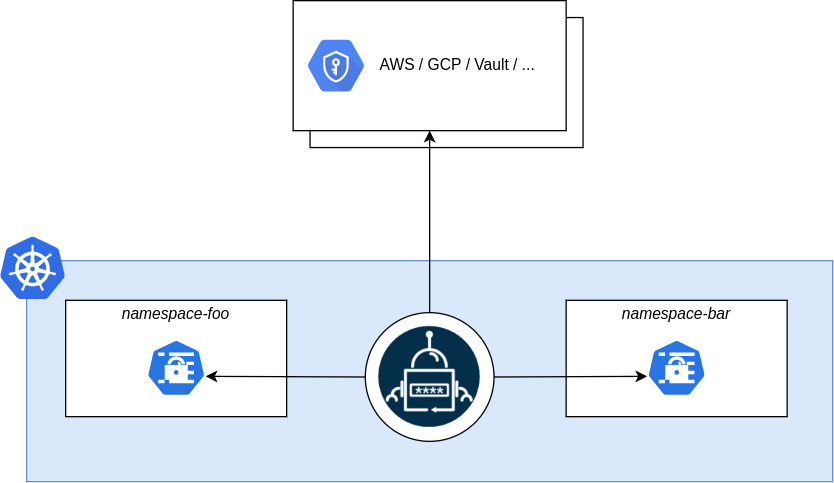
HashiCorp Vault
Install
HashiCorp Vault can be installed using ArgoCD using the following manifest:
apiVersion: argoproj.io/v1alpha1
kind: Application
metadata:
  name: vault
  namespace: argocd
spec:
  project: default
  destination:
    server: https://kubernetes.default.svc
    namespace: vault
  sources:
    - repoURL: https://helm.releases.hashicorp.com
      chart: vault
      targetRevision: 0.33.0
      helm:
        valueFiles:
          - $values/vault/values.yml
    - repoURL: your-repo-with-values # placeholder: replace with the repo holding your values.yml
      targetRevision: HEAD
      ref: values
Here, values.yml is provided in a separate repo as per this article
Once Vault is installed and its keys/token generated, an access policy for ESO needs to be added.
Secret engine
In Secrets, enable a new engine of type kv and give it a path such as k8s. Once done, a secret can be added, for example one named testsecret with a key-value pair testkey: testvalue.
ACL policy
In Access control, create a new ACL policy named, for example, eso with the following policy
path "k8s/data/*" {
  capabilities = ["read"]
}
Here, the path k8s is that of the kv secret engine created above.
Authentication method
In Access control create a new authentication method of type Kubernetes with eponymous path.
Settings can be left as default except Kubernetes API URL which is to be set to https://kubernetes.default.svc:443
Once the method is created, a role is to be created in the corresponding tab of the method, with the following settings
- name:
eso - Alias name source:
serviceaccount_name - Bound service account names:
* - Bound service account namespaces:
*
Moreover, on the same role configuration page, under Tokens, set Generated Token’s Policies to eso. This allows the eso role to access the eso kv secret engine created above.
Note that using * for both the service account names and namespaces lets any service account in the cluster log in with this role, and thereby read every secret under k8s. This is convenient on a single-user cluster, but these can be restricted to the service account ESO authenticates with.
External Secrets Operator
Install
The External Secrets Operator can also be installed via ArgoCD:
apiVersion: argoproj.io/v1alpha1
kind: Application
metadata:
  name: external-secrets
  namespace: argocd
spec:
  project: default
  destination:
    server: https://kubernetes.default.svc
    namespace: external-secrets
  source:
    repoURL: https://charts.external-secrets.io
    chart: external-secrets
    targetRevision: 2.6.0
  syncPolicy:
    syncOptions:
      - ServerSideApply=true
With ESO installed, a ClusterSecretStore object can be created using the following manifest:
apiVersion: external-secrets.io/v1
kind: ClusterSecretStore
metadata:
  name: vault
spec:
  provider:
    vault:
      server: http://vault.vault:8200
      path: k8s
      version: v2
      auth:
        kubernetes:
          mountPath: kubernetes
          role: eso # Must match ACL policy created above
External Secret
With Vault and ESO installed and configured, an ExternalSecret object can be created using manifests such as the following:
apiVersion: external-secrets.io/v1
kind: ExternalSecret
metadata:
  name: test-externalsecret
  namespace: test
spec:
  refreshInterval: 5m0s
  secretStoreRef:
    name: vault
    kind: ClusterSecretStore
  target:
    name: test-secret-from-vault
    creationPolicy: Orphan
  dataFrom:
    - extract:
        key: testsecret
Note that the creationPolicy is set to Orphan so that the secret can continue existing independently from the liveness of Vault or ESO.
This should result in:
$ kubectl get externalsecrets.external-secrets.io -n test test-externalsecret
NAME                  STORETYPE            STORE   REFRESH INTERVAL   STATUS         READY   LAST SYNC
test-externalsecret   ClusterSecretStore   vault   5m0s               SecretSynced   True    3m21s
One can then confirm that a secret has indeed been created:
$ kubectl get secrets -n test
NAME                     TYPE     DATA   AGE
test-secret-from-vault   Opaque   1      5m17s